


The costs that never show up in Jira worklogs: subcontractors, licences, travel
Also published on Atlassian Community
In this guide
Take a website rebuild for a client. The team logs every hour in Jira, and the worklog cost looks healthy. Then the month closes and four more lines arrive: a copywriting subcontractor, a design tool, a browser testing service and a train trip to a client workshop. None of them is a worklog, so none of them is in the Jira numbers.
MarginRadar shows budget and margin for Jira Cloud spaces, from Radrly. This guide uses one example, a ledger of four non-labour costs, first with native Jira and then in the app.
The ledger
| Cost | Category | Amount | Charged to the client? |
|---|---|---|---|
| Copywriting subcontractor | Subcontractor | 2,400 | Yes |
| Client workshop travel | Travel | 680 | Yes |
| Browser testing service | Software | 390 | Yes |
| Design tool seats | Software | 540 | No |
| Total | 4,010 | 3,470 billable |
Four lines, 4,010 in total, of which 3,470 goes on the client invoice and 540 stays as the agency's own cost.
Option 1: keep it in Jira with native features
You can model costs as work items:
- Create a work type called Expense in the space (for a company managed space, under Settings > Work items > Work types, then add it to the space's work type scheme).
- Add a number field Amount, a select field Category and a checkbox or select for Billable.
- Create one Expense work item per cost, optionally as a child of the epic it belongs to.
- Sum them with Automation: a scheduled rule using Lookup work items with JQL like
project = WEB AND type = Expense, then a smart value such as{{lookupIssues.customfield_10060.sum}}. Atlassian's knowledge base article on summing values to a parent shows the pattern.
What this gives you: the costs live next to the work, with history and an owner.
What it does not give you:
- Visibility. Anyone who can browse the space can read the Amount field. Jira Cloud has no field level security; the request is JRACLOUD-69298.
- Labour cost. Worklogs are hours. Without rates, the expense total and the hours never meet in one figure.
- A billable split. You need a second number field and a second rule for the billable part.
- Clean work item counts. Expense items show up in boards, velocity and filters unless you exclude them everywhere.
Option 2: a spreadsheet
Most teams end here: export worklogs, apply rates, add a tab for expenses, total it per month. It is flexible and it works, until two people keep two copies.
The same ledger in MarginRadar
MarginRadar calculates labour cost from native Jira worklogs and the rate cards you set by role, person or space. Expenses are the non-labour part. They count in the space's spent amount and margin, next to the worklog cost.
Here is the same ledger on the Expenses tab of the space page.
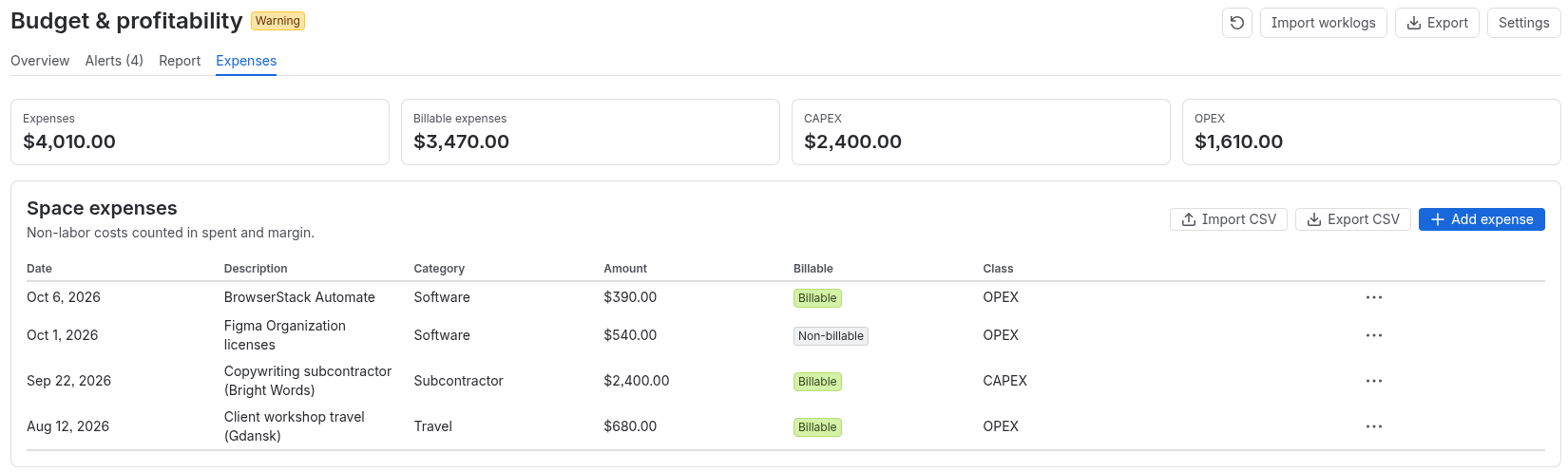
How each line was entered, on Standard:
- Add expense asks for the date, category, description and amount. Amounts are in the site's base currency.
- Billable, with a billable amount, marks what you charge on. The design tool seats are left unticked.
- Epic is optional and links the expense to an epic in the same space.
- Categories start as Software, Subcontractor, Travel, Hardware and Other. Finance users can add their own, with a default billable setting.
- Import CSV takes up to 5,000 rows, with a dry run to check the file first. Export CSV gives the list back.
The period report on the Report tab then shows cost, billable value, hours and expenses together, by role, epic, day or (for Finance users) person.
Advanced adds two fields per expense: Class (CAPEX or OPEX) and Nature (Direct or Indirect), with a CAPEX and OPEX split on the tab. On Standard those two fields are not stored, so the CAPEX and OPEX tiles in the screenshot only appear on Advanced.
Who sees it: Finance users and PMs see the Expenses tab. Viewers do not, so the team can follow burn without seeing what a subcontractor costs.
Limits to know
- MarginRadar asks for rate cards before the first expense, so set those up first.
- One base currency per site. A cost paid in another currency has to be converted before you enter it.
- Descriptions are typed by hand, so keep personal data out of them.
- It is a delivery view of cost and margin. Your accounting system stays the source of truth for invoices.
Quick answers
How can I track non-labour costs in Jira with native features?
Create an Expense work type with a number field Amount, a select field Category and a Billable checkbox or select, add one Expense work item per cost, and sum them with a scheduled Automation rule that uses Lookup work items with JQL such as project = WEB AND type = Expense.
What are the limits of tracking expenses as Jira work items?
Anyone who can browse the space can read the Amount field, because Jira Cloud has no field level security (JRACLOUD-69298). Worklogs are hours, so without rates the expense total and the hours never meet in one figure. A billable split needs a second field and rule, and Expense items show up in boards, velocity and filters unless you exclude them everywhere.
How do expenses work in MarginRadar?
Expenses are the non-labour part of cost. They count in the space's spent amount and margin next to the labour cost from worklogs and rate cards. Add expense asks for date, category, description and amount in the site's base currency, with an optional billable amount and an optional epic link. Import CSV takes up to 5,000 rows with a dry run, and Export CSV gives the list back.
Who can see expenses in MarginRadar?
Finance users and PMs see the Expenses tab. Viewers do not, so the team can follow burn without seeing what a subcontractor costs. CAPEX or OPEX class and Direct or Indirect nature are Advanced.